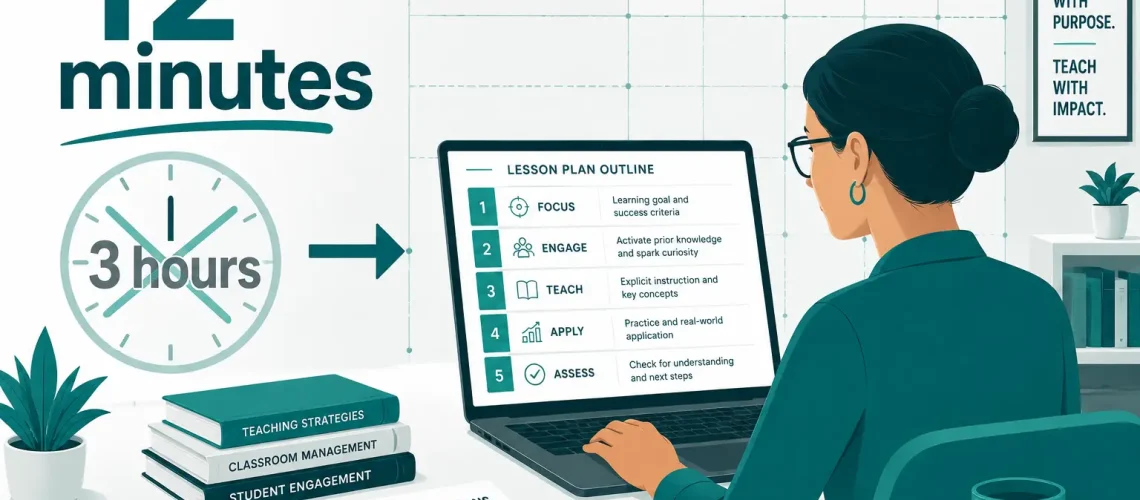
Teachers and L&D leads who discover a good AI lesson plan generator free tool never go back to blank-document planning sessions, and the time math makes that obvious: what used to consume three hours now ships in twelve minutes.
The Hidden Cost of Manual Lesson Planning — And Why It Compounds
Most organizations undercount the true cost of curriculum work. A mid-level instructional designer in the U.S. bills between $65 and $95 per hour. A single onboarding module — objectives, activities, assessments, facilitator notes — eats 15 to 20 hours before a single learner sees it. Scale that across a 30-module onboarding program and you’re looking at $30,000 to $57,000 in labor before you’ve trained one employee.
K–12 teachers face a different version of the same problem. The Learning Policy Institute’s 2023 research found that U.S. teachers spend an average of 10.7 hours per week on non-instructional tasks — lesson planning sits near the top of that list. That’s 10.7 hours not spent on student feedback, differentiation, or the actual craft of teaching.
The arithmetic here argues for automation, not debate. An AI lesson plan generator free tier doesn’t just cut costs — it removes the planning bottleneck entirely, letting educators and L&D teams redirect cognitive load toward review, refinement, and delivery. The best tools generate a structured lesson complete with learning objectives, pacing guides, formative checks, and differentiation notes in under 60 seconds. That’s not a productivity improvement. That’s a category shift.
What a Good AI Lesson Plan Generator Free Actually Produces
Skeptics assume “free” means “generic.” The output quality from current free tiers of tools like MagicSchool AI, Diffit, and Eduaide.ai challenges that assumption directly.
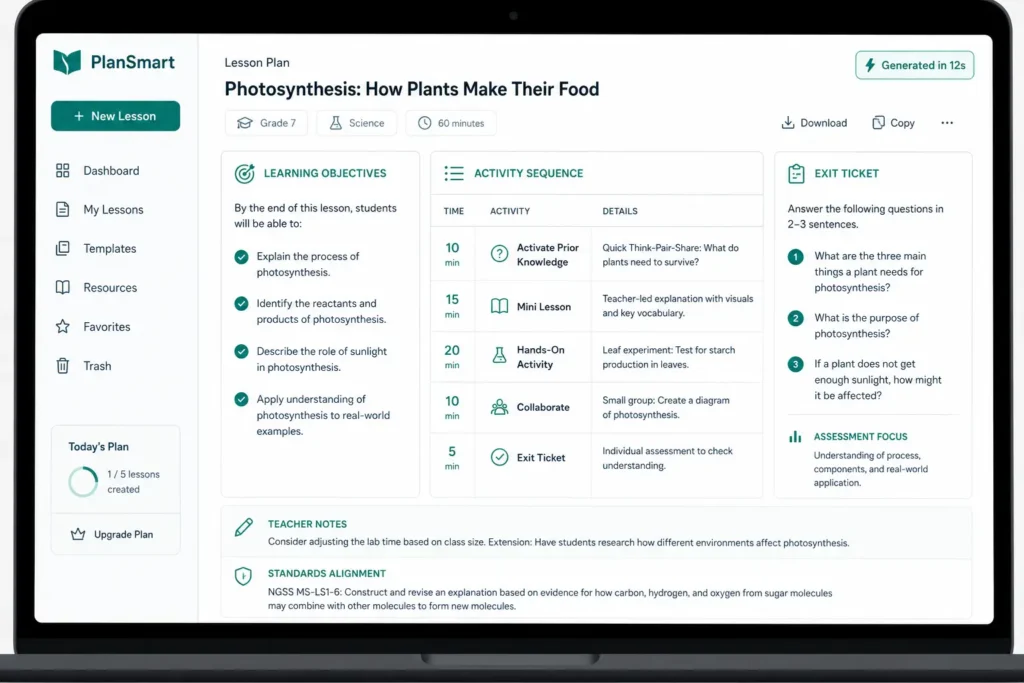
A typical AI lesson plan generator free workflow looks like this: you input a subject, grade level or learner persona, duration, and one or two specific learning goals. The model returns a full lesson arc — hook activity, direct instruction segment, guided practice, independent application, and exit ticket or assessment prompt. Most tools also generate differentiation scaffolds for advanced learners and those who need additional support, without requiring a separate prompt.
MagicSchool AI’s free tier, for instance, lets teachers generate complete lesson plans, rubrics, and parent communication drafts. Teachers at Tulsa Public Schools reported saving 7+ hours per week after adopting AI planning tools district-wide in 2024. That’s not anecdote — Tulsa published the data as part of a formal pilot review.
For corporate L&D teams, tools like Coursebox and Teachable’s AI features produce SCORM-ready module outlines from a brief content prompt. An AI lesson plan generator free pass through Coursebox can produce a structured five-module course outline — with quiz questions mapped to each objective — before your instructional designer finishes their morning stand-up. The free tier has real constraints (export limits, module caps), but as a planning and drafting layer, it delivers immediate value with zero budget outlay.
The practical floor here: even a rough AI-generated lesson plan cuts planning time by 60 to 75 percent, because editing a structured draft is always faster than building from a blank page.
Where AI Lesson Plan Generator Free Break Down (And What to Do About It)
No tool earns an honest review without naming its failure modes.
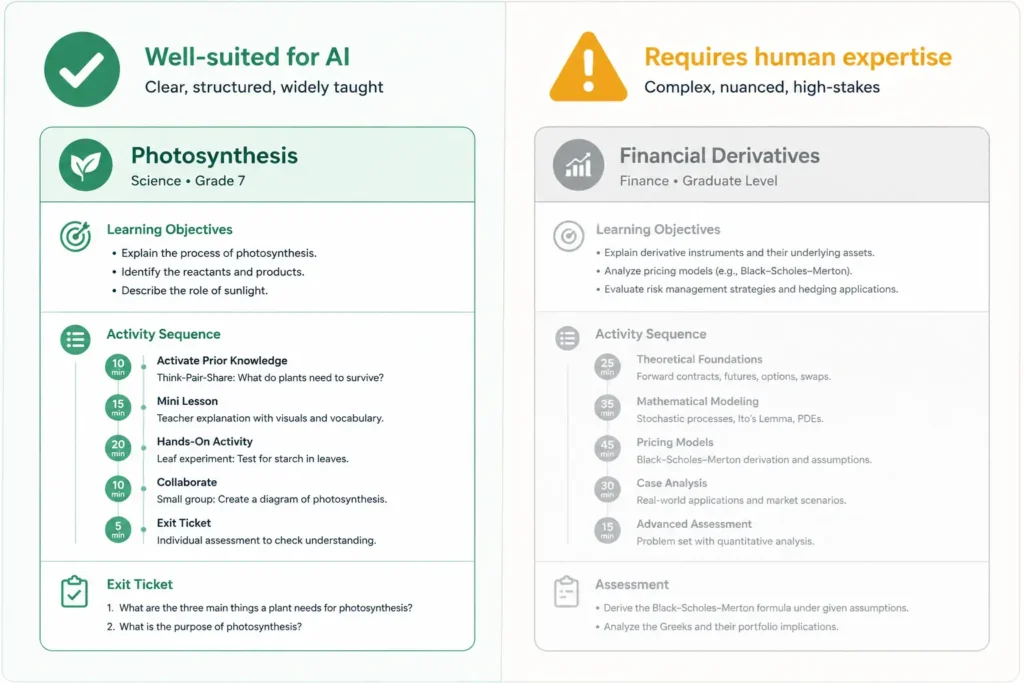
Free tiers of AI lesson plan generator free tools fail predictably in three areas. First, subject-matter depth. A free tool generating a lesson on photosynthesis performs well. A free tool generating a lesson on options pricing strategy for new derivatives traders performs poorly — it produces structurally correct output with factually shallow content. You need a subject expert in the loop for technical or specialized domains.
Second, context-blindness. Free tools don’t know your learners. They don’t know that your onboarding cohort skews toward non-native English speakers, or that your Grade 8 class reads two years below grade level, or that your sales team has already sat through three product training modules this quarter and has attention fatigue. You have to front-load that context in your prompt, which requires prompt literacy — a skill most educators haven’t been trained on yet.
Third, assessment quality. Free-tier AI lesson plan generator free produce assessment questions, but the questions frequently test recognition over application. A multiple-choice question that checks whether a learner remembers a definition is not the same as a scenario-based prompt that tests whether they can apply a concept under ambiguous conditions. Reviewing and upgrading assessment items remains a human task.
The fix for all three: treat the AI output as a first draft, not a final product. Block 20 minutes to review objectives alignment, upgrade one or two assessment items to higher-order thinking, and inject learner-specific context. You still save 80 percent of your planning time while producing a materially better lesson than the AI alone generates.
How to Evaluate and Deploy an AI Lesson Plan Generator Free at Scale
If you’re a founder building an internal learning function, or an administrator rolling out AI tools across a school or district, the evaluation criteria matter more than the tool brand.
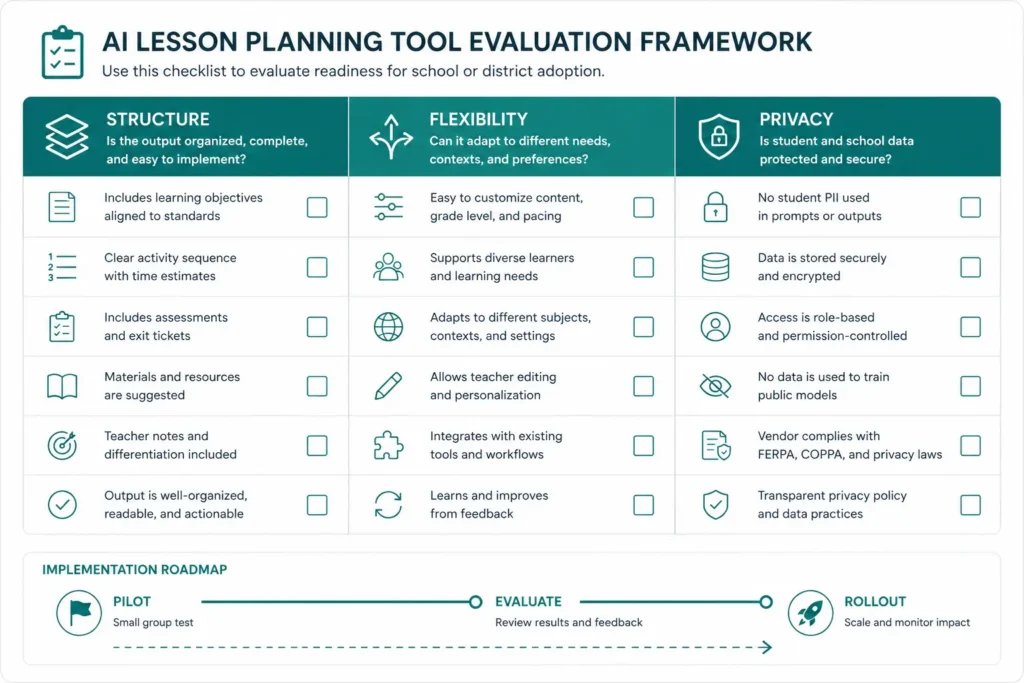
Start with output structure. A useful AI lesson plan generator free tool produces lessons with explicit learning objectives written in measurable terms (Bloom’s verbs, not vague outcomes), a logical activity sequence with time allocations, and at least one formative assessment moment. If the tool produces a narrative lesson description without those structural elements, move on.
Second, evaluate prompt flexibility. Can you specify learner persona, prior knowledge level, format constraints, and content depth in a single prompt? Tools that require you to click through preset menus rather than accept open-ended input constrain your output ceiling.
Third, check data handling. Several free AI lesson plan tools train on user inputs. If your lesson content includes proprietary product information or sensitive learner data, verify the privacy policy before you generate a single lesson. This matters more for corporate L&D than for classroom teachers, but it matters everywhere.
For rollout at scale, run a structured pilot with five to ten educators or designers. Give each person three planning tasks — one they’d describe as routine, one complex, one highly specialized. Measure time-to-first-draft and rate output quality on a simple rubric. That data tells you where the tool creates leverage and where human effort stays irreplaceable.
The best AI lesson plan generator free tools earn adoption because they solve a real problem — planning time — without creating a new one. The teachers and L&D leads who integrate them effectively don’t use AI to think less; they use it to think faster, which means they spend their cognitive budget where it compounds: on learner relationships, feedback quality, and the moments that make learning actually stick.
The gap between educators who use an AI lesson plan generator free and those who don’t now measures in hours per week and thousands in annual labor costs — that gap widens every month these tools improve. Pick one, run a two-week pilot, and let your own data make the argument.
The Best Free AI Tools for Teachers 2026 Are Your Fastest Shortcut Into the AI Industry Every beginner who cracked AI fast did it with the same unfair advantage — they learned on free tools built for teachers, not engineers. Most people entering the AI industry assume they need a CS degree, a paid Coursera subscription, or six months of self-study before they touch anything real. That assumption costs them a year. The best free AI tools for teachers 2026 shatter that assumption completely — because they strip away jargon, give you working models on day one, and reward curiosity over credentials. If you want to build real AI skills fast, start where educators start, not where researchers start. This article lays out exactly which tools to use, how to sequence them, and what you can realistically build in 30 days — all without spending a cent. Why Beginner AI Learners Learn Faster With Teaching-Focused Tools The AI industry’s biggest onboarding failure is throwing beginners at developer-first documentation. PyTorch tutorials assume you already know matrix calculus. OpenAI’s API docs assume you know what a REST endpoint is. Teaching-focused tools make the opposite assumption — that you know nothing, and that your job is to figure things out by experimenting, not reading theory. Google’s Teachable Machine, for instance, lets you train an image classifier in under four minutes using your webcam. No code. No cloud setup. No API key. You drag photos, hit “train,” and watch a neural network learn what a thumbs-up looks like versus a peace sign. That single four-minute session teaches you more about supervised learning than two hours of watching a lecture — because you feel the feedback loop. You see your model fail, adjust your data, and fix it yourself. That is how experts actually think about ML, just compressed into a beginner interface. This is the core argument: the best free AI tools for teachers 2026 accelerate beginners not because they are simple, but because they make complexity visible without making it prerequisite. You interact with real AI systems — transformer models, classifiers, generative pipelines — through interfaces designed to surface what matters, not hide it. 4 min To train your first model with Teachable Machine $0 Total cost of the starter stack below 30 days To build demonstrable AI fluency The Exact Free AI Tool Stack to Use in 2026 Not every free tool earns a place in your learning stack. Some are demos with no depth. Others require institutional login access that blocks most new learners. The tools below are accessible to anyone with a browser, actively maintained heading into 2026, and genuinely useful — not just impressive-looking toys. These are the best free AI tools for teachers 2026 that also serve as the ideal AI beginner curriculum. Teachable Machine Train image, sound & pose classifiers. No code. Instant feedback on data quality. Google Colab (Free Tier) Run Python and Jupyter notebooks with free GPU. Your first real coding environment. ML for Kids Build Scratch-based AI projects. Forces you to think about training data before models. Hugging Face Spaces Run and fork live AI demos — text, image, audio. See production models, read their code. fast.ai (Free Course) Top-down practical deep learning. Builds a working model in lesson one, explains later. Claude.ai / ChatGPT Free Your AI pair-programmer. Use it to explain code errors, generate test datasets, debug logic. Sequence matters more than tool choice. Start with Teachable Machine to feel the data-model-prediction loop. Move to ML for Kids to practice labeling and dataset design decisions. Then open Hugging Face Spaces and start forking demos — reading the code behind tools you just used. By week three, open Google Colab and run your first notebook. The fast.ai free course runs parallel to all of this, one lesson per week. This stack builds conceptual understanding and hands-on capability simultaneously, which is exactly what the best free AI tools for teachers 2026 are designed to do. From Zero to Demonstrable: What You Actually Build in 30 Days Beginners make the mistake of measuring progress by content consumed — hours watched, articles read, courses completed. Founders and hiring managers measure AI fluency differently: they want to see what you built, what broke, and what you did about it. Thirty days on the free stack above produces three concrete artifacts that demonstrate real AI literacy. Week one produces a working image classifier with documented accuracy — you define the problem, collect your own training data, train the model, and write two paragraphs about why it underperforms on edge cases. Week two produces a text classification project on Hugging Face: you fork an existing sentiment analysis model, retrain it on a custom dataset you build yourself, and deploy it as a public Space. Week three opens Colab — you run a computer vision notebook end-to-end, change hyperparameters deliberately, and document what each change did to validation accuracy. Week four connects everything: you write a one-page technical brief explaining the tradeoffs between three approaches to your original problem from week one. That four-week output — three working projects plus a written technical analysis — gives any beginner more credibility than most six-month bootcamp certificates. It exists because you used the best free AI tools for teachers 2026 the way their designers intended: as scaffolding for experimentation, not passive instruction. Why Free AI Tools Give Beginners a Structural Advantage in 2026 Paid courses create a dangerous illusion of progress. You complete modules, collect badges, and feel like you understand machine learning — but you never fought with a bad dataset, debugged a broken training loop, or explained a model’s failure to yourself in plain language. Free tools remove the completion-metric reward system entirely. Nobody congratulates you for finishing Teachable Machine. You build something, it either works or it does not, and you figure out why. The best free AI tools for teachers 2026 also reflect where the industry actually operates. The biggest shift in applied AI over the last two years is not model architecture — it is data quality, prompt
Founders care about leverage. Teachers need the same. ChatGPT prompts for teachers act like reusable micro-scripts that compress hours of cognitive work into minutes. You stop writing from scratch and start orchestrating outcomes. When a teacher uses ChatGPT with structured prompts, three things happen immediately. First, output quality stabilizes because prompts enforce constraints (rubrics, tone, reading level). Second, iteration speed jumps because you tweak inputs, not entire documents. Third, consistency improves across classes and sections. A simple example shows the leverage. Instead of drafting ten versions of feedback comments, a teacher builds one prompt: “Generate 10 personalized report comments for Grade 6 math using rubric criteria A–D, include one actionable improvement per student, keep tone constructive, limit to 60–80 words.” That single prompt produces batch output with consistent quality. You edit for nuance, not structure. Multiply that across lesson plans, quizzes, and parent emails, and you get a weekly time recovery of several hours. For Series A founders, the parallel feels obvious: prompts function like internal tooling. You define the interface once and reuse it. That’s why ChatGPT prompts for teachers deliver ROI quickly—low setup cost, immediate time savings, and compounding gains. Build a prompt stack that ships outcomes, not drafts Most teachers fail because they treat prompts like casual questions. High-performing users design ChatGPT prompts for teachers as modular assets. Each prompt has inputs, constraints, and a defined output format. Start with four core modules: 1) Lesson generator 2) Assessment builder 3) Differentiation engine 4) Feedback generator Here’s a high-performance prompt for assessments: “Create a 15-question mixed-format test on photosynthesis for Grade 7. Include 5 MCQs, 5 short answers, 5 application questions. Map each question to Bloom’s level. Provide an answer key and a 10-mark rubric.” Notice the specificity. You remove ambiguity and force structured output. That’s the difference between generic AI use and effective ChatGPT prompts for teachers. Stack these prompts in a simple doc or your CRM-like workflow. Tag by subject and grade. Over time, you build a library that behaves like an internal API for teaching tasks. Real workflows that cut hours every week Let’s move from theory to execution. These workflows show how ChatGPT prompts for teachers compress multi-step tasks. Workflow 1: 30-minute lesson build Result: A complete lesson package in under 30 minutes. Workflow 2: Batch grading comments in 20 minutes Result: Personalized comments without repetitive writing fatigue. Workflow 3: Weekly quiz pipeline Result: Consistent assessment quality with minimal manual drafting. Workflow 4: Parent communication at scale Result: Clear, consistent communication without time drain. Each workflow relies on precise ChatGPT prompts for teachers. You define once, reuse forever. That’s how you turn AI into a production system, not a novelty. Avoid failure modes and enforce quality control Bad prompts waste time. Strong systems include guardrails. If you want ChatGPT prompts for teachers to perform at a high level, you need quality controls. Define constraints explicitlyAlways include grade level, tone, word limits, and output format. Vague prompts create inconsistent outputs. Force structureAsk for sections, bullet points, or tables. Structured outputs reduce editing time and improve readability. Add evaluation stepsAfter generating content, run a second prompt: “Review this lesson plan against Grade 7 standards. Identify gaps and suggest improvements.” This creates a feedback loop inside the system. Use iteration deliberatelyDon’t accept the first output blindly. Adjust inputs and constraints. Treat prompts like code—you refactor them. Keep a prompt libraryDocument your best-performing ChatGPT prompts for teachers. Version them. Improve them over time. This turns individual wins into institutional knowledge. Validate with real classroomsTest outputs in live settings. Measure engagement, comprehension, and time saved. Keep what works. Kill what doesn’t. Founders understand this instinctively: systems beat effort. Teachers who apply the same mindset extract maximum value from ChatGPT prompts for teachers. Written By SagarAiHub.com
You don’t run a school—but you absolutely run learning systems. Onboarding, internal training, product education, customer success playbooks—all of these depend on structured lesson plans. Most teams treat them as side work. That mindset slows execution. When you understand how to use ChatGPT to make lesson plans, you compress hours of planning into minutes. You also standardize quality across teams. Instead of relying on one “good trainer,” you create a repeatable system. Here’s the reality: founders at Series A don’t struggle with ideas. They struggle with bandwidth. Writing structured, outcome-driven lesson plans requires time, domain clarity, and iteration. ChatGPT eliminates the first two constraints and accelerates the third. Let’s break it down from a business lens: If you ignore how to use ChatGPT to make lesson plans, you force your team to reinvent structure every time. That cost compounds. The exact workflow: how to use ChatGPT to make lesson plans that scale You don’t need prompts—you need a system. Most people fail because they ask vague questions. You need structured inputs and iterative refinement. Start with a simple framework: Here’s a real example of how to use ChatGPT to make lesson plans for onboarding a new sales hire: Step 1: Input a structured prompt“Create a 5-day lesson plan for onboarding a SaaS sales executive. Include daily objectives, key concepts, exercises, and measurable outcomes. Audience: beginner-level sales hire. Goal: close first deal within 30 days.” This prompt works because it removes ambiguity. When you learn how to use ChatGPT to make lesson plans, clarity in inputs determines output quality. Step 2: Force structureAsk ChatGPT to format like this: You’re not asking for content—you’re asking for a system. Step 3: Iterate for depthTake Day 1 and refine:“Expand Day 1 into a 60-minute detailed session with scripts, roleplay scenarios, and evaluation criteria.” This step separates average users from high-leverage operators. Knowing how to use ChatGPT to make lesson plans means you never accept the first output. Step 4: Add real-world constraints“Adjust this plan assuming the trainee only has 2 hours per day and no prior SaaS experience.” Now the lesson becomes usable, not theoretical. This workflow turns ChatGPT into a planning engine—not a content generator. Real ROI: how to use ChatGPT to make lesson plans inside your company Let’s move beyond theory. Here’s how founders actually apply how to use ChatGPT to make lesson plans across functions. 1. Employee onboarding Instead of generic docs, create structured learning paths. Example: You use ChatGPT to generate each week’s lesson plan, including exercises and checkpoints. Result: new hires ramp faster. 2. Customer education Most startups lose users because they don’t educate them. Use how to use ChatGPT to make lesson plans to build: Ask:“Create a 3-module lesson plan to help users master [feature]. Include examples, exercises, and success metrics.” Now your “help section” becomes a structured learning journey. 3. Internal skill development You don’t need expensive trainers. Want your marketing team to improve ad performance?Use how to use ChatGPT to make lesson plans like this:“Create a 7-day advanced Meta Ads training plan for intermediate marketers. Focus on scaling campaigns and reducing CPA.” You instantly get a curriculum your team can execute. 4. Founder-led knowledge transfer You hold critical knowledge—but you don’t have time to teach everyone. Use ChatGPT as a translator:“Convert my notes on fundraising strategy into a 5-session lesson plan for startup founders.” Now your thinking scales without your presence. The ROI doesn’t come from content—it comes from consistency and speed. That’s why understanding how to use ChatGPT to make lesson plans gives you leverage. Advanced tactics: how to use ChatGPT to make lesson plans that outperform humans Most people stop at “generate a plan.” That’s baseline. You want compounding advantage. 1. Layer expertise into prompts Don’t ask generic questions. Inject context. Instead of:“Create a lesson plan on SEO” Say:“Create a 5-day SEO lesson plan for early-stage founders focusing on quick wins, technical audits, and content ROI. Avoid beginner definitions.” Now ChatGPT aligns with your level. 2. Use constraint-driven planning Constraints improve output. Examples: When you refine how to use ChatGPT to make lesson plans, constraints act as quality filters. 3. Build modular lesson blocks Instead of one large plan, generate reusable components: Then assemble them into custom lesson plans based on need. This turns ChatGPT into a content library generator. 4. Simulate real-world scenarios Ask for practical environments:“Include real startup scenarios where users must solve problems using the lesson concepts.” This removes fluff and increases retention. 5. Add evaluation systems Most lesson plans fail because they lack measurement. Always include: Example prompt:“Add performance metrics and evaluation criteria to each lesson.” Now your lesson plans drive outcomes, not just learning. 6. Iterate like a product Treat lesson plans like product features: When you truly master how to use ChatGPT to make lesson plans, you stop thinking in documents—you think in iterations. Written By SagarAiHub.com External Resources for “How to Use ChatGPT to Make Lesson Plans” Source Type Link Why It Matters Suggested Usage in Article OpenAI Official Documentation https://platform.openai.com/docs Primary source explaining how ChatGPT works and how prompts affect output quality Use in introduction or workflow section to support prompt engineering concepts Edutopia Education Resource https://www.edutopia.org/article/chatgpt-teachers Provides practical insights on using ChatGPT in teaching and lesson planning Use in education or lesson planning examples section Harvard Business Review Business Authority https://hbr.org Covers AI-driven productivity, efficiency, and ROI in organizations Use in ROI and business impact section MIT Sloan Academic/Business Insights https://mitsloan.mit.edu/ideas-made-to-matter Focuses on AI transformation in modern organizations Use in advanced strategy or scaling section UNESCO Global Authority https://www.unesco.org/en/artificial-intelligence/education Offers global perspective on AI in education and future learning systems Use in conclusion or long-term impact discussion